

AOMEI Backupper Review: All-in-one Backup Powerhouse for Everyday Users
Explore our in-depth AOMEI Backupper review: free features, easy setup, and tips for secure backups. Perfect for Windows users seeking reliable data protection.
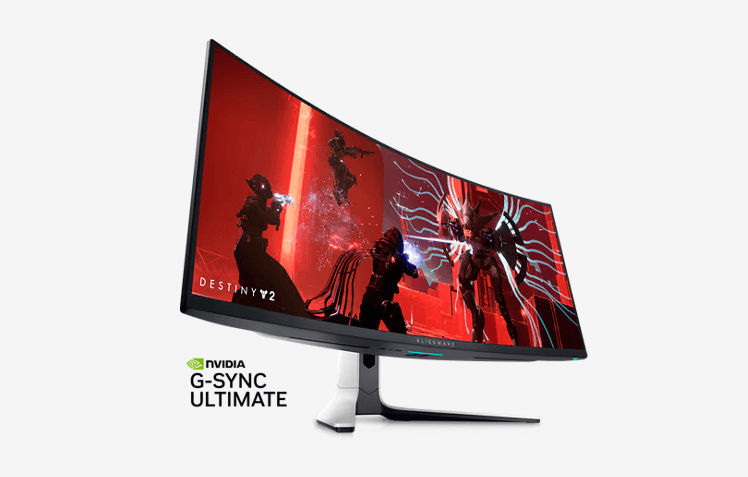
The Dell Alienware AW3423DW introduces the innovative QD-OLED technology, a blend of OLED and quantum dot monitors, enhancing picture quality with exceptional black levels and a broader color spectrum.
This ultrawide gaming monitor boasts native G-SYNC and FreeSync support, although OLEDs are susceptible to burn-in. Dell has addressed this concern with settings and a comprehensive three-year burn-in replacement warranty.
The AW3423DW is a 34-inch curved monitor with a curve radius of 1800R, perfectly suited for immersive gaming.
It combines excellent motion handling, native G-SYNC variable refresh rate (VRR) support, and the versatility of FreeSync compatibility.
Its QD-OLED technology excels in delivering deep blacks and vibrant colors, providing a superior visual experience compared to LED-backlit monitors.
The monitor's HDR capability further enhances the quality of gaming and media consumption.
Designed with gamers in mind, the monitor features a gamer-oriented white and black body, with a subtle curve that enhances the screen's visibility.
The back of the monitor includes zone lighting around the stand attachment and the Alienware logo.
Despite the presence of slight flex along the top bezel and near the inputs, the overall build quality is commendable.
The heavy stand provides stability even during adjustments, though the cooling fan's noise level might be noticeable in quiet environments.
The AW3423DW offers practical ergonomics, including a 4.3-inch height adjustment, tilt range of -21° to 5°, and swivel range of -20° to 20°.
Its VESA 100x100 compatibility allows for wall mounting, and cable management is facilitated by routing cables through the stand.
With dimensions of 32.1" x 14.3" x 5.3" (with a thickness of 11.2" including the display) and a weight of 21.8 lbs with the display, the monitor is substantial but appropriately sized for its features.
The monitor comes with an internal power supply and is accompanied by an array of accessories, including DisplayPort and Mini DisplayPort to DisplayPort cables, an HDMI cable, a USB-B to USB-A cable, and a power cable.
The package also includes a VESA adapter, VESA screws, safety information, Alienware cards, a calibration report, and user guides.
The Dell Alienware AW3423DW QD-OLED Ultrawide Gaming Monitor is a remarkable addition to the gaming landscape.
Its QD-OLED technology elevates the visual experience with deeper blacks and wider color representation.
The combination of native G-SYNC and FreeSync support, along with its curved design, further enhances its appeal to gamers.
While considerations about burn-in and the fan's noise level should be noted, the AW3423DW stands as a strong choice for gamers seeking superior picture quality and immersive gaming experiences.


